
Activating your TM SIM is the first thing you must do before using calls, texts, or mobile data. Many users insert the SIM and expect it to work instantly, but activation and SIM registration are now required.
In the Philippines, all SIM cards must be registered under the law before they become fully active. This guide explains the exact steps to activate your TM SIM quickly without confusion.
What Is TM SIM Activation
TM (Touch Mobile) is a prepaid service under Globe Telecom. Activating your TM SIM means making it ready for use on the network, including calls, SMS, and data.
Activation usually happens after:
- Inserting the SIM into your phone
- Detecting signal from the network
- Completing SIM registration
Requirements Before Activation
Before starting, make sure you have:
- A TM SIM card
- A mobile phone (unlocked)
- Valid ID for registration
- Stable internet connection (for online registration)
Step-by-Step: How to Activate TM SIM
Step 1: Insert the SIM Card
- Turn off your phone
- Insert the TM SIM into the SIM slot
- Turn your phone back on
If your phone is compatible, it should detect the network automatically.
Step 2: Wait for Signal
After inserting the SIM:
- Look for signal bars on your phone
- You may receive a welcome message
If there is no signal, try restarting your phone or switching airplane mode on and off.
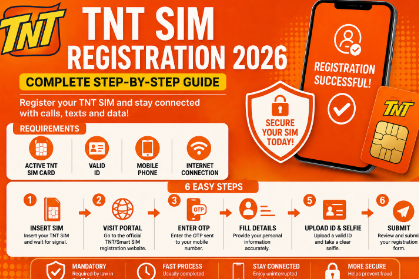
Step 3: Register Your TM SIM
Under the SIM Registration Act, you must register your SIM to activate it fully.
- Visit the official TM/Globe SIM registration portal
- Enter your mobile number
- Input the OTP sent to your SIM
- Fill in your personal details
- Upload a valid ID and selfie
- Submit the form
Once completed, you will receive a confirmation message.
Step 4: Restart Your Phone
After successful registration:
- Restart your phone
- Wait for the network to refresh
Your SIM should now be fully active.
Step 5: Test Your SIM
To confirm activation:
- Make a call
- Send a text message
- Turn on mobile data
If all services work, your TM SIM is activated successfully.
How Long Does Activation Take
- SIM detection: Instant
- Registration approval: Usually within a few minutes
- Full activation: Within a few minutes after confirmation
In some cases, it may take longer depending on network traffic.
Common Problems and Fixes
No Signal After Inserting SIM
- Restart your phone
- Try another device
- Check if the phone is network locked
Not Receiving OTP
- Wait a few minutes and try again
- Check signal strength
- Restart your phone
Registration Failed
- Make sure your ID is clear
- Enter correct details
- Use a stable internet connection
SIM Not Working After Registration
- Restart your phone
- Wait for system update
- Contact support if the issue continues
Important Tips
- Always use your real details during registration
- Keep your reference number or confirmation message
- Avoid buying pre-registered SIM cards
- Activate your SIM immediately after purchase
Also Read: SIM Registration TNT
FAQs
Do I need to activate TM SIM before using promos
Yes, your SIM must be activated and registered before you can subscribe to any promo.
Can I activate TM SIM without registration
No, registration is mandatory under Philippine law.
How do I know if my SIM is active
If you can call, text, and use data, your SIM is active.
Conclusion
Activating a TM SIM in 2026 is simple, but registration is the most important step. Without it, your SIM will not work properly.
Just insert the SIM, register it online, and restart your phone. Once done, you can start using calls, texts, and data without any issues.
If you follow these steps correctly, your TM SIM will be activated in just a few minutes.